
What Is DNS Propagation?
DNS propagation is the period of time it takes for DNS changes to spread across all global servers. Think of it like updating your phone number — even if you save it on your phone, it may take a while for everyone else to update their own contact list.
When you update DNS:
- Some locations show the new IP
- Others still show the old one
- Some bounce between both for a few hours
Propagation usually takes:
- 5- 30 minutes and up to 24 hours worldwide
- In rare cases, 48 hours (depending on ISP caching)
This is perfectly normal, and checking propagation helps you confirm if everything is working properly.
Why You Should Check DNS Propagation
You should always check DNS status after updates because:
- It confirms your DNS change is correct
- It shows whether your domain is pointing to the right server
- It helps you troubleshoot website downtime
- It helps you confirm email settings (MX, SPF, DKIM)
- It reduces guesswork and confusion
How to Check DNS Propagation and Status Online
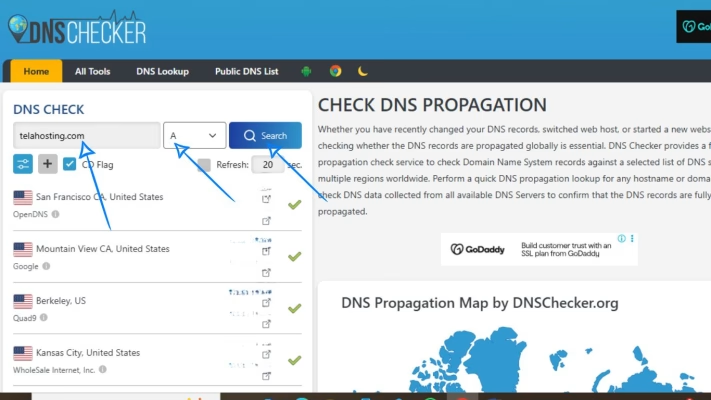
1. Use DNSChecker.org
This is one of the best tools for checking global DNS spread.
How to use it:
1. Go to dnschecker.org
2. Enter your domain name
3. Select the type of DNS record you want to check:
- A
- CNAME
- MX
- TXT
- NS
4. Click Search
You’ll see updates from multiple countries (green = updated, red = not updated yet)
This tool gives you a worldwide view of what’s happening.
2. Use WhatsMyDNS.net
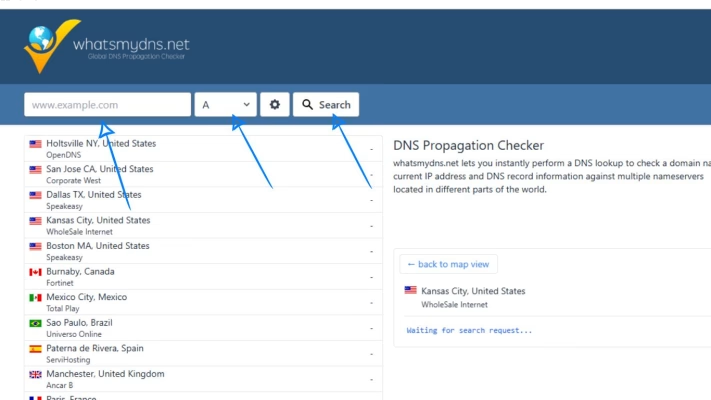
Another popular option that works just like DNSChecker.
Steps:
- Visit whatsmydns.net
- Type your domain
- Choose the DNS record type
- Click Search
- Review global propagation results
It’s simple, fast, and very accurate.
3. Use Google Admin Toolbox (Dig Tool)
If you want a more technical check, Google offers a detailed DNS lookup tool.
How to use it:
- Visit toolbox.googleapps.com/apps/dig
- Enter your domain
- Select the record type
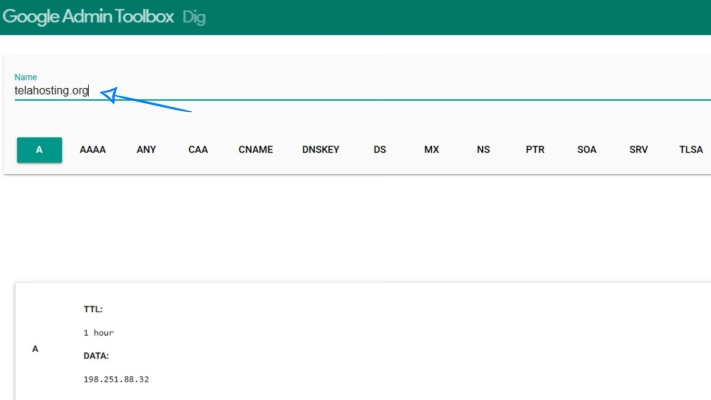
This tool shows raw DNS data — perfect if you’re troubleshooting email or SPF issues.
4. Check from Your Own Device (Local Test)
While global tools show worldwide results, sometimes you want to know what your network sees.
You can test using:
- Command Prompt (Windows)
- Terminal (Mac/Linux)
For example:
- To check A-Record: nslookup yourdomain.com
- To check nameservers: nslookup -type=ns yourdomain.com
- To check mail records: nslookup -type=mx yourdomain.com
This helps you know if your own DNS cache is updated.
What to Do If Your DNS Is Not Propagating Yet
If your DNS hasn’t updated everywhere, don’t panic — it’s normal. But here are a few things you can do to speed up the process:
1. Clear your browser cache: Sometimes your browser stores old DNS data.
2. Flush your DNS (Local Cache):
- Windows: ipconfig /flushdns
- Mac: sudo killall -HUP mDNSResponder
3. Restart your router: Your router may also be caching old DNS records.
4. Confirm your DNS records are correct: A tiny mistake in an IP address or TXT record can cause hours of confusion.
5. Be patient: Propagation takes time — that’s just how the internet works.
Common Problems You May Notice During DNS Propagation
Some issues are normal during the propagation window:
- Your website loads sometimes but not all the time
- Email works on one device but not another
- Some people can open your site; others see errors
- Your site loads on mobile but not laptop
This is all temporary and resolves once global DNS servers update.
Conclusion
With simple tools like DNSChecker and WhatsMyDNS, you can instantly confirm if your domain is correctly pointing to your hosting server. Whether you changed an A-record, added MX or TXT records, or moved your entire site, these online tools help you stay confident that everything is working smoothly.
And if things don’t seem to update yet, give it some time — DNS propagation is natural and temporary.
FAQs
1. How long does DNS propagation take?
Usually 5–30 minutes, but up to 24 hours globally.
2. How do I know if my DNS change worked?
Use tools like DNSChecker.org or WhatsMyDNS.net.
3. Why does my website load on some devices but not others?
Your DNS may still be propagating on certain networks.
4. Do I need to clear my cache after DNS updates?
Yes — it helps your device load the new DNS.
5. Can DNS fail to propagate?
It will always propagate if your records are correct. Delay only happens when caching hasn’t refreshed.
Need help? Our friendly support team is always here for you! Reach out below.
Happy hosting! 🌟