
What Does “Pointing a Subdomain to Another Server” Mean?
When you point a subdomain to another server, you’re telling the internet: “Hey, when someone visits this subdomain, send them to a different server IP.” For example:
- yourdomain.com → stays on telaHosting
- blog.yourdomain.com → goes to another hosting provider or server
This is very common for:
- Blogs hosted elsewhere
- Web apps
- External landing pages
- SaaS tools
- Custom APIs
And it all starts with DNS.
What You Need Before You Start
Before making any changes, make sure you have:
- Access to DirectAdmin on telaHosting
- Your domain name
- The IP address or hostname of the other server
- A clear idea of which subdomain you want to point
Once you have these, you’re good to go.
Method 1: Point a Subdomain Using an A Record (Most Common)
This method is best when the other server gives you an IP address.
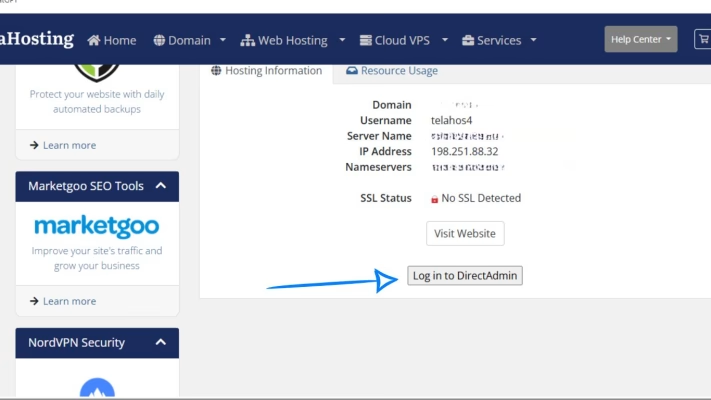
STEP 1: Log In to DirectAdmin
- Go to your telaHosting Client Area
- Open your hosting package
- Click Login to DirectAdmin
STEP 2: Open DNS Management
Inside DirectAdmin:
- Go to Account Manager
- Click DNS Management
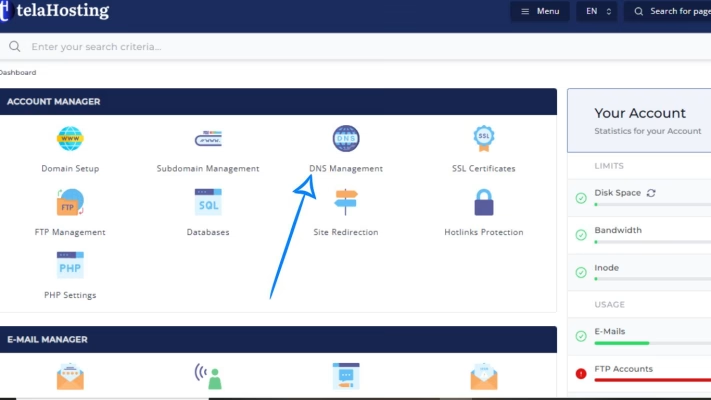
This is where all DNS records live.
STEP 3: Add an A Record for the Subdomain
1. Click Add Record
2. Choose A Record
Now fill in the details:
- Name: Enter only the new domain name e. g blog (DirectAdmin will automatically make it blog.yourdomain.com)
- Value (IP Address): Enter the IP address of the other server.
3. Click Save
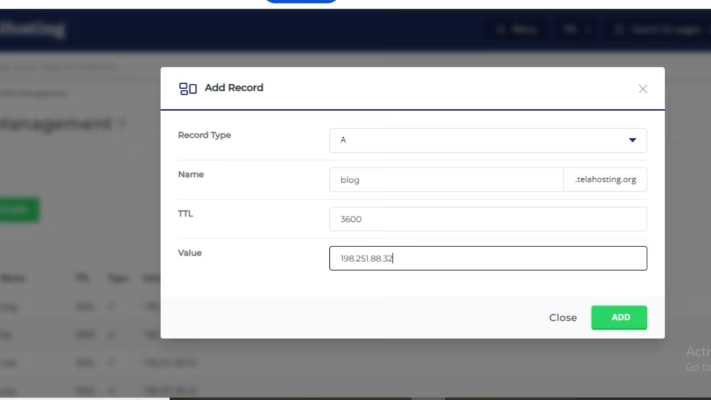
That’s it. Your new domain now points to another server.
Method 2: Point a Subdomain Using a CNAME Record
Use this method when the other server gives you a hostname instead of an IP address.
STEP 1: Add a CNAME Record
- Go to DNS Management
- Click Add Record
- Choose CNAME
Fill in the details:
- Name: app
- Value: example.com. (Always include the dot at the end.)
- Click Save
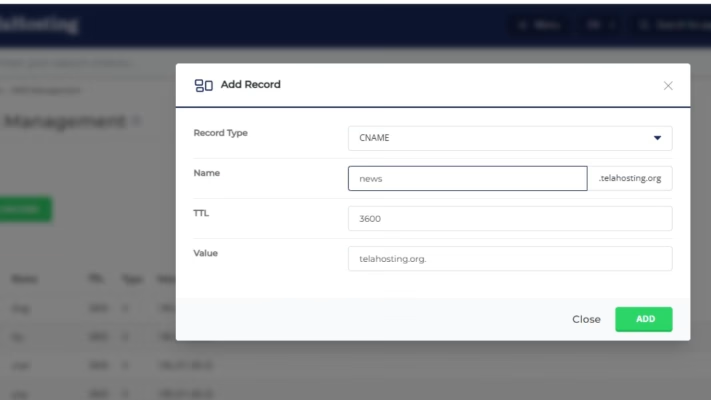
Your new domain will now follow the target hostname.
Remove Conflicting Records
Before or after adding your A or CNAME record, make sure:
- There is no existing A record for the same subdomain
- There is no existing CNAME record for the same subdomain
A new domain can only have one main pointing record.
Do You Need to Create the Subdomain in DirectAdmin?
No, you do NOT need to create the subdomain under “Subdomain Management” if it’s pointing to another server.
Creating it there will try to host it on that hosting server, which you don’t want. DNS alone is enough.
How Long Does It Take to Propagate?
After saving the record, it takes 5–15 minutes and up to 24 hours globally.
You can check propagation using:
Just search for the A or CNAME record.
Common Mistakes to Avoid
Here are a few things to watch out for:
- Using both A and CNAME together (don’t do this)
- Forgetting the dot at the end of a CNAME target
- Entering the full domain in the Name field
- Creating the subdomain under “Subdomains” unnecessarily
- Expecting instant results (DNS needs time)
Avoid these, and everything will work smoothly.
Conclusion
Whether you use an A record or a CNAME, the process takes just a few minutes and gives you full flexibility over where each part of your website lives.
This setup is perfect for businesses, developers, and growing websites that need more control — without touching their main site.
FAQs
1. Can I point multiple subdomains to different servers?
Yes. Each new domain can point to a different server.
2. Will this affect my main website?
No. Only the the new domain is affected.
3. Should I use A record or CNAME?
- Use A record if you have an IP address.
- Use CNAME if you have a hostname.
4. Why is my subdomain not loading?
Check the IP/hostname, wait for DNS propagation, and confirm there are no conflicting records.
5. Can I undo this later?
Yes. Simply delete or edit the DNS record.
Need help? Our friendly support team is always here for you! Reach out below.
Happy hosting! 🌟