
What Is Email Forwarding?
Email forwarding simply means that any email sent to one address will automatically be delivered to another address.
For example: [email protected] → forwards to → [email protected]
This helps you:
- Check all your messages in one inbox
- Separate business and personal emails
- Create multiple custom emails without managing many inboxes
Do You Need DNS to Set Up Email Forwarding?
Email forwarding itself doesn’t require adding special DNS records, but the DNS of your domain must be correctly pointed to your hosting email service.
This means:
- Your MX records must point to telaHosting
- Your SPF record must include your mail server
- Your domain must use the correct nameservers
If these DNS settings are wrong, email forwarding may fail or messages may never arrive.
So before you set up forwarding, make sure:
- MX Records → Point to mail.yourdomain.com (or telaHosting server)
- A-Record → mail.yourdomain.com points to your server IP
- SPF → Allows your domain mail server to send/forward emails
Once your DNS is correct, email forwarding inside DirectAdmin works perfectly.
STEP 1: Log Into DirectAdmin
- Go to your telaHosting Client Area
- Select your hosting plan
- Click “Login to DirectAdmin”
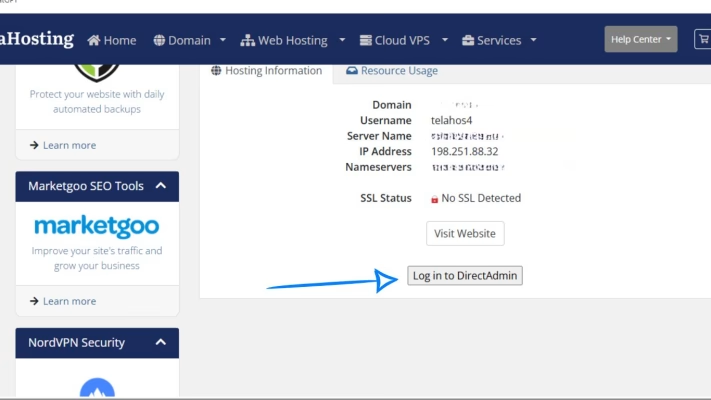
You’ll land in your hosting control panel.
STEP 2: Go to Email Manager
Inside DirectAdmin:
- Scroll to Email Manager
- Click on Forwarders
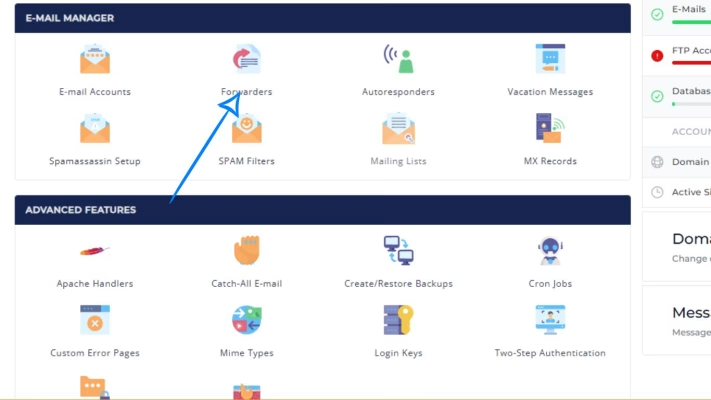
This page controls all email forwarding rules.
STEP 3: Create a New Email Forwarder
1. Click Create New E-mail Forwarder
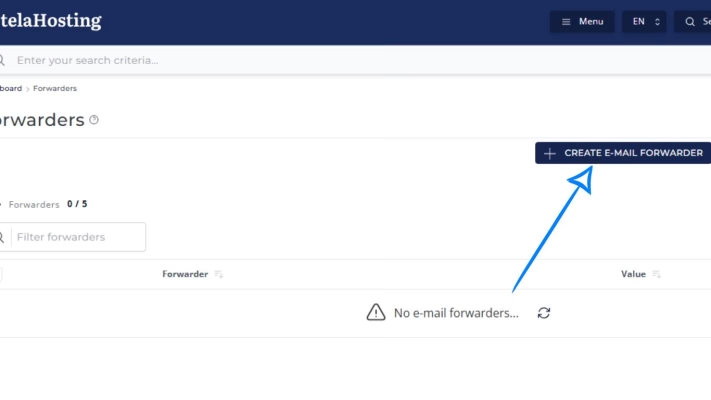
2. In “Forwarder Name,” enter the email address you want to forward FROM. Example: [email protected]
3. Under “Destination,” enter the email address you want to forward TO. Example: [email protected]
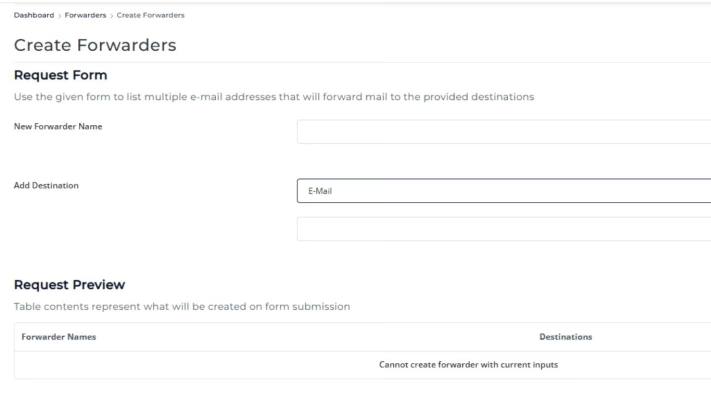
You can add one or multiple destination emails.
STEP 4: Save the Forwarder
Click Create. DirectAdmin will immediately activate the forwarding rule. That’s it — email forwarding is now live.
What If Email Forwarding Doesn’t Work?
If forwarding isn’t working, the issue usually comes from DNS.
Here’s what to check:
1. Check Your MX Records
- Go to: DirectAdmin → DNS Management
- Your MX record should look like: yourdomain.com. MX 10 mail.yourdomain.com.
- If you’re using telaHosting default email, this MUST be correct.
- If the MX is pointing to another provider (like Google or Microsoft), DirectAdmin email forwarding will NOT work.
- In that case — you must set forwarding inside the provider (not DirectAdmin).
2. Make Sure “mail.yourdomain.com” Points to Your Server
Add an A-Record like this: mail A YOUR_SERVER_IP
Without this, your domain won’t accept mail.
3. Add a Proper SPF Record
A recommended SPF for telaHosting is: v=spf1 a mx ip4:YOUR_SERVER_IP ~all
Replace YOUR_SERVER_IP with your server’s IP address. This ensures forwarded mail does not get marked as spam.
4. Disable Email Routing Conflicts (Important!)
Inside DirectAdmin:
- Go to Email Manager → MX Records
- Check the setting “Local Mail Server”
Use this guide:
- If using telaHosting email → Keep Local Mail Server: ON
- If using external email (Google, Microsoft) → Set Local Mail Server: OFF
This single option fixes most forwarding issues.
Conclusion
The main job of DNS is to ensure your domain knows where to handle emails, while DirectAdmin takes care of forwarding them to your preferred inbox.
With just a few clicks, you can have all your messages delivered exactly where you want them — making email management simpler and more organized.
FAQs
1. Can I forward emails to multiple addresses?
Yes, DirectAdmin allows forwarding to unlimited recipients.
2. Does email forwarding require extra DNS records?
No. Only correct MX and SPF settings are required.
3. Can I forward email to Gmail?
Yes. Just make sure SPF is correct to avoid spam issues.
4. Why is my forwarded mail landing in spam?
Your SPF and DKIM might not be correct. Fixing them improves deliverability.
5. Can I forward email if I’m using Google Workspace or Microsoft 365?
Forwarding must be set inside your email provider — not DirectAdmin.
Need help? Our friendly support team is always here for you! Reach out below.
Happy hosting! 🌟