

What Are SPF and DKIM?
SPF (Sender Policy Framework)
This tells receiving mail servers, “Yes, Mailchimp/SendGrid is allowed to send emails using my domain.”
Without an SPF record, your emails can be flagged as suspicious or spoofed.
DKIM (DomainKeys Identified Mail)
This adds a digital signature to your outgoing emails. It proves the email came from you and wasn’t changed on its way to the recipient.
Together, SPF + DKIM = better email deliverability + more inbox placement.
Step 1: Log in to Your cPanel
- First, log in to your telaHosting Client Area using your registered email and password.
- From the dashboard, select your hosting account and click “Log in to cPanel” to access the dashboard.
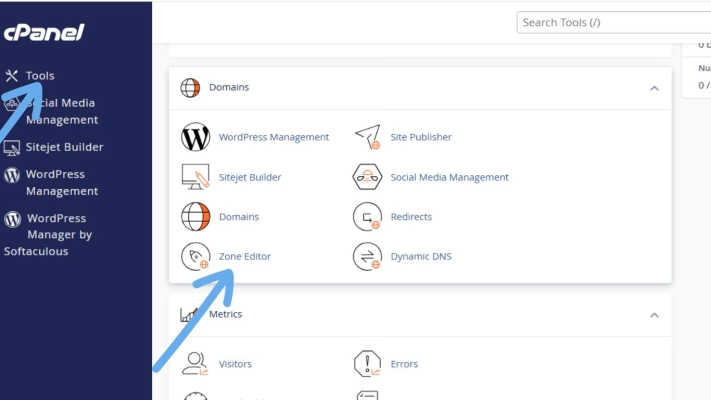
- Once inside, look for Zone Editor —this is where you’ll manage DNS records.
Step 2: Open the Zone Editor
- Inside the Domains section, click Zone Editor. You’ll see your domain name(s).
- Click Manage beside the domain you want to set up. This is where all DNS records are stored — A, MX, TXT, CNAME, and more.
Step 3: Add the SPF Record
For MailChimp
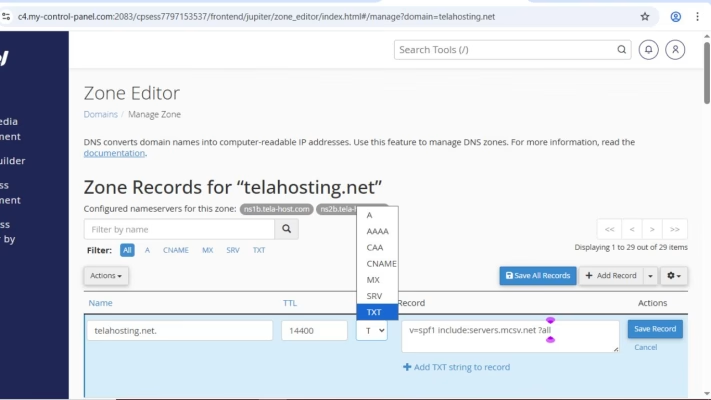
- Go to Add Record → choose TXT Record.
- In the Name/Host: yourdomainname.com.
- In the Value/Record paste: v=spf1 include:servers.mcsv.net ?all
- Save the record.
For SendGrid
- Again, go to Add Record → choose TXT Record.
- Name/Host: yourdomainname.com
- Value/Record: v=spf1 include:sendgrid.net ~all
- Save the record.
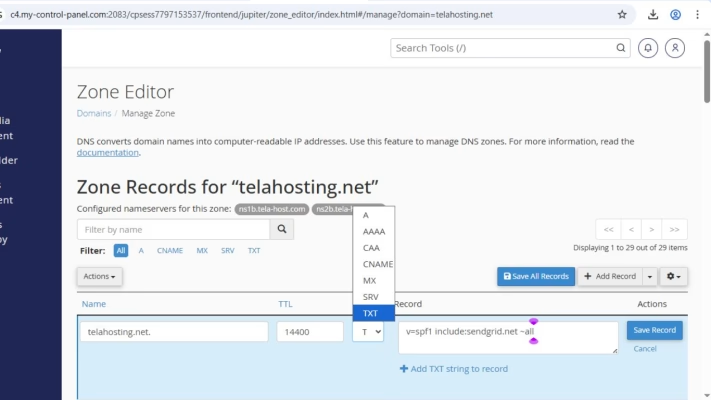
This tells email servers that Mailchimp or SendGrid is authorized to send emails for your domain.
Step 4: Add the DKIM Record
For Mailchimp
Mailchimp gives you two DKIM CNAME records that look like this:
Record 1: Name: k1._domainkey.yourdomain.com
Value: dkim.mcsv.net
Record 2: Name: k2._domainkey.yourdomain.com
Value: dkim2.mcsv.net
How to Add DKIM CNAMEs in cPanel:
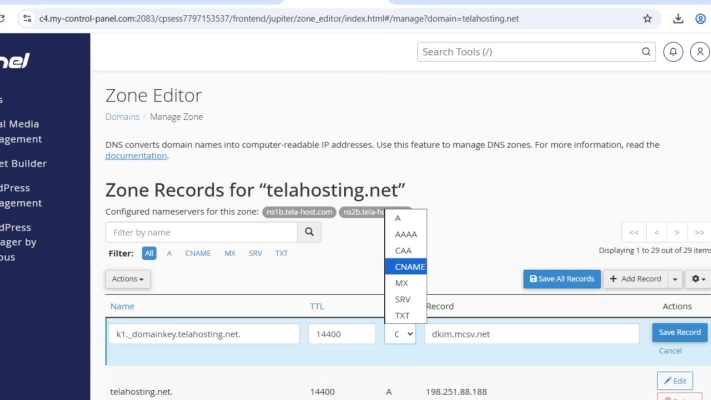
- Click Add Record
- Choose CNAME
- Name/Host: k1._domainkey
- Points to/Target: dkim.mcsv.net
- Save
- Repeat for the second DKIM record
You’re done with Mailchimp authentication.
For SendGrid
When you set up domain authentication inside SendGrid, it generates 3 CNAME records. They typically look like this:
- Name: s1._domainkey.yourdomain.com. Value: s1.domainkey.u123456.wl.sendgrid.net
- Name: s2._domainkey.yourdomain.com. Value: s2.domainkey.u123456.wl.sendgrid.net
- Additional CNAME used for verification — varies per account.
How to Add DKIM CNAMEs in cPanel:
- Click Add Record
- Choose CNAME
- Name/Host: s1._domainkey.yourdomain.com
- Points to: s1.domainkey.u123456.wl.sendgrid.net
- Save
- Repeat for the second and third DKIM record
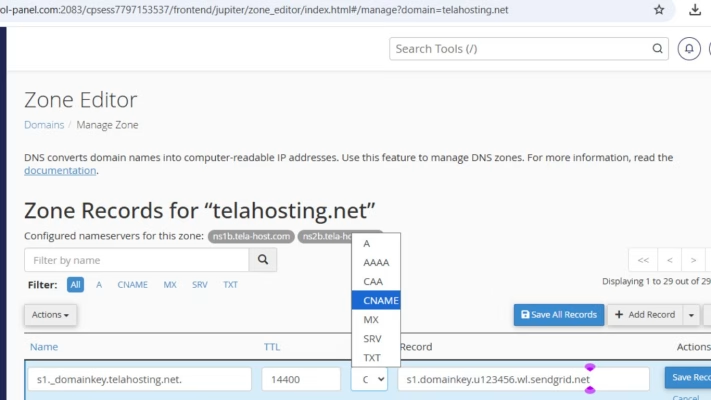
These DKIM records ensure your emails carry a verified signature, boosting deliverability.
Step 5: Verify Your Setup
- After adding SPF and DKIM records, log in to your Mailchimp or SendGrid dashboard.
- Use their Domain Authentication/Verification tool to confirm everything is set up correctly.
- DNS changes may take a few minutes to a few hours to propagate, so don’t panic if verification isn’t instant.
Common Mistakes to Avoid
- Typos: Even a small mistake in the record value can break authentication.
- Duplicate SPF Records: You should only have one SPF record per domain. If you need multiple services, combine them into one line.
- Not Saving Changes: Always hit “Save Record” after entering values.
Final Thoughts
Adding SPF and DKIM for Mailchimp or SendGrid is one of the best things you can do to improve email deliverability.
With telaHosting, you already have a reliable hosting partner in Nigeria, so all you need to do is follow these steps carefully. Once done, your emails will look more professional, avoid spam filters, and build trust with your customers.
FAQs
1. How long does it take for SPF and DKIM to activate?
Usually 5 minutes to 24 hours.
2. Do I need both SPF and DKIM?
Yes. Both are required for good email deliverability.
3. Can I use Mailchimp and SendGrid at the same time?
Yes, but you must merge your SPF record.
4. Why is my DKIM failing?
Most times, it’s due to a typo or wrong CNAME format.
5. Can telaHosting help me set this up?
Absolutely — our support team is always ready to assist.
Need help? Our friendly support team is always here for you! Reach out below.
Happy hosting! 🌟