
What Are SRV Records?
SRV (Service) records are special DNS records used by applications to find the right server to connect to. They tell apps:
- where the service is located
- which port to use
- what protocol to follow
- which server has priority
SRV records is like a digital GPS that guides apps to the correct destination on your domain.
Why Will you Need SRV Records?
You’ll need SRV records when connecting apps such as:
- Microsoft Teams / Office 365
- Zoom
- Discord
- VoIP and communication platforms
Now let’s go into the setup.
Step 1: Log In to Your telaHosting cPanel
- First, log in to your telaHosting Client Area using your registered email and password.
- From the dashboard, select your hosting account and click “Log in to cPanel” to access the dashboard.
- Once inside, look for Zone Editor under the Domain section. This is where you’ll manage DNS records.
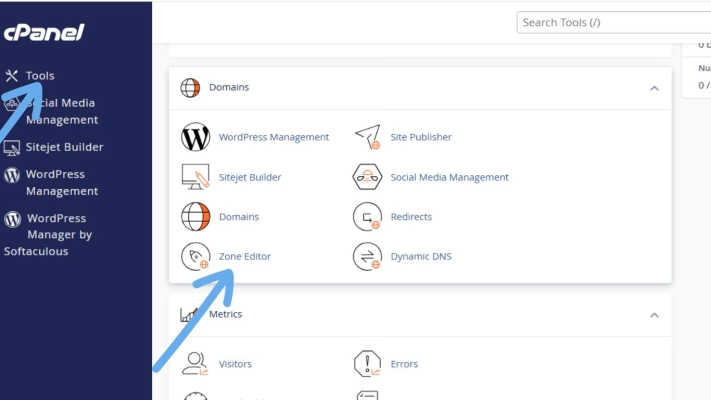
Step 2: Open the Zone Editor
- Click Zone Editor. This opens the DNS manager for your domain.
- Next to your domain name, click Manage.
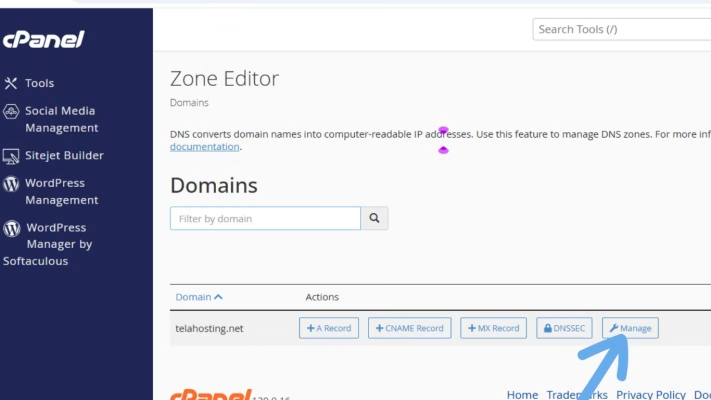
You’re now inside the DNS control room where you’ll add the SRV records.
Step 3: Click “Add Record” and Choose SRV
- At the top-right of your DNS list, click Add Record → Add SRV Record
- A form will open where you’ll enter:
- Name
- TTL
- Priority
- Weight
- Port
- Target
Here’s what each field means:
- Name → The service and protocol
- Priority → Lower value = higher priority
- Weight → Used when multiple records exist
- Port → The port number the app uses
- Target → Where the service is hosted
Now let’s look at real examples for Microsoft Teams, Zoom, and Discord.
Adding SRV Records for Microsoft Teams
Microsoft Teams requires SRV records for features like VoIP calls, SIP, and communication routing. You must add TWO separate SRV records.
Microsoft Teams SRV record:
Record 1 (SIP TLS)
- Name: _sip._tls
- TTL: 3600
- Priority: 100
- Weight: 1
- Port: 443
- Target: sipdir.online.lync.com
Record 2 (SIP Federation)
- Name: _sipfederationtls._tcp
- TTL: 3600
- Priority: 100
- Weight: 1
- Port: 5061
- Target: sipfed.online.lync.com
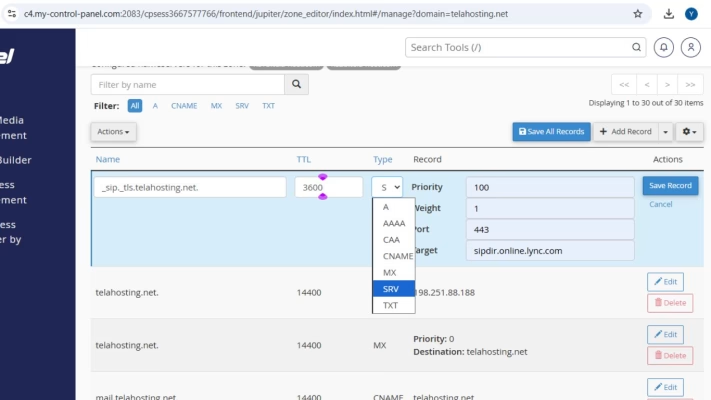
Just repeat the same procedure in cPanel to add both.
Adding SRV Records for Zoom
Zoom uses SRV records for SIP and voice calling integration. Example Zoom SRV record:
- Name: _sip._tls
- TTL: 3600
- Priority: 100
- Weight: 1
- Port: 443
- Target: sip.zoom.us
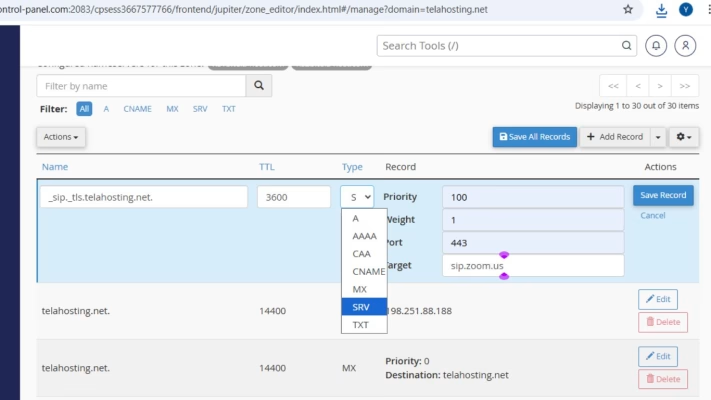
If Zoom gives you custom SRV details, use the exact values provided.
Adding SRV Records for Discord
Discord SRV records are commonly used for:
- Game servers
- Voice servers
- Bot hosting
- Minecraft servers
Below is the most common example (Minecraft server SRV record).
- Name: _minecraft._tcp (or specific service Discord gives you)
- TTL: 3600
- Priority: 0
- Weight: 5
- Port: (your server port, e.g. 25565)
- Target: yourserver.yourdomain.com
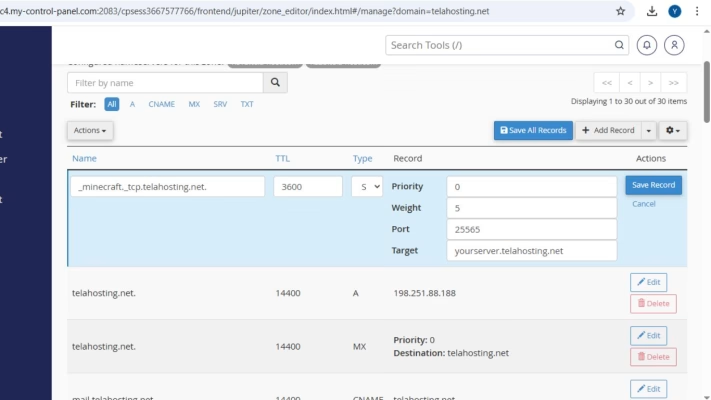
Remember: You must also create an A-record pointing to your server IP.
Step 4: Save Each SRV Record
Once you’ve filled all fields, click Save Record. Your SRV record is now live.
Step 5: Wait for DNS Propagation
DNS changes usually update within 5 minutes –24 hours. To check if your SRV record is live, use:
Just enter the service name (example: _sip._tls.yourdomain.com).
Common Issues and How to Fix Them
1. “Invalid SRV Name” Error”: Make sure the name begins with: _service._protocol
2. Record Not Working: Check that:
- Target does not end with a period
- Priority is correct
- Weight is not set to 0 (unless required)
- Port is correct
3. Conflicting Records: Some services require removing old SRV records first.
4. You Forgot the A-record: If your target is a subdomain, create an A-record pointing to your server IP.
Conclusion
With telaHosting’s user-friendly cPanel, you can set up SRV records in just a few minutes and get your applications fully connected to your domain.
If you ever get stuck, telaHosting support is always here to help you.
FAQs
1. How long does it take for SRV records to propagate?
Usually within minutes, but sometimes up to 24 hours.
2. Can I add multiple SRV records for the same service?
Yes, especially for redundancy.
3. Do I need an A-record for SRV records to work?
Yes, the Target of the SRV must point to a valid A-record.
4. Why is my app not detecting the SRV record?
DNS may still be propagating or the record may have a formatting error.
5. Can telaHosting help me configure SRV records?
Absolutely, just contact support anytime.
Need help? Our friendly support team is always here for you! Reach out below.
Happy hosting! 🌟